
the psycho cat on an HP Mini with Ubuntu
Just Beginning
Introduction
Read this first before you try Ubuntu*
Which Ubuntu to pick?
Getting Ubuntu
Making a bootable USB of Ubuntu
Ubuntu inside Windows
Dual-boot with Windows
Install Desktop CD Ubuntu
Modest Specs
Install Software
Security in Ubuntu
Where's the Terminal?
Password in Terminal
Next Steps
Install Proprietary Drivers
Mount Windows
Install Proprietary Plugins
Finding iTunes Alternatives
Use Wine
Beyond the Basics
Backing up Ubuntu
Upgrade Ubuntu*
Change boot menu
Playing Around
Unity to classic Gnome
Unity Gnome/KDE Plasma Comparison
Install KDE
Install XFCE
Pure Ubuntu
Pure Kubuntu
Pure Xubuntu
Pure Lubuntu
Troubleshooting
Can't sudo
Graphical sudo
Forgot password
* Off-site link
Cheap Plugs
If you've found these tutorials useful, please consider donating a small amount to one of my favorite non-profits/charities. Every little bit helps.
You may also want to consider donating directly to the Ubuntu project.
Making a bootable USB of Ubuntu

This work is licensed under a Creative Commons Attribution-ShareAlike 3.0 Unported License.
Introduction
If your computer can boot from USB, then you can save yourself a CD by using UNetbootin to "burn" the disk image (the Ubuntu .iso file) to USB. This method has the advantage of not wasting a blank CD and of getting a snappier performance during the live session, since USB can usually be read faster than optical drives.
As of Ubuntu 12.04, the .iso file sizes are now over 700 MB, which means you cannot even burn it to CD any more. You would have to waste a whole 4 GB blank DVD instead—all the more reason to "burn" to USB instead.
Things to know first
- Your USB drive should be formatted as FAT32 or FAT16. It cannot be formatted as NTFS, HFS+, or Ext4. Most USB drives come formatted as FAT32 or FAT16 already, so this shouldn't be a big worry.
- Some USB sticks come with firmware that will prevent USB booting of Ubuntu from working. It's called U3. You can read more about it (including how to remove it) on Wikipedia.
- I've used this for USB sticks, a Sansa Clip MP3 player, and an SD card. It's a pretty versatile boot method. Just make sure you have at least 900 MB of free space on the drive.
- Most recently made computers can boot from USB. If you have to burn a CD or DVD, go to the CD burning page. (As far as I know, Macs will not boot non–OS X hard drives from USB, so you will have to burn a CD.)
- If your computer's BIOS does not support booting CDs or USB, you may have to employ a workaround called PLoP. I've never used this before, and it looks complicated to me, so your mileage may vary.
Using UNetbootin

After you download UNetbootin, double-click it. The unetbootin-windows-###.exe file you download isn't an installer file. It's the actual program. Windows may prompt you to authenticate. Go ahead and do so.
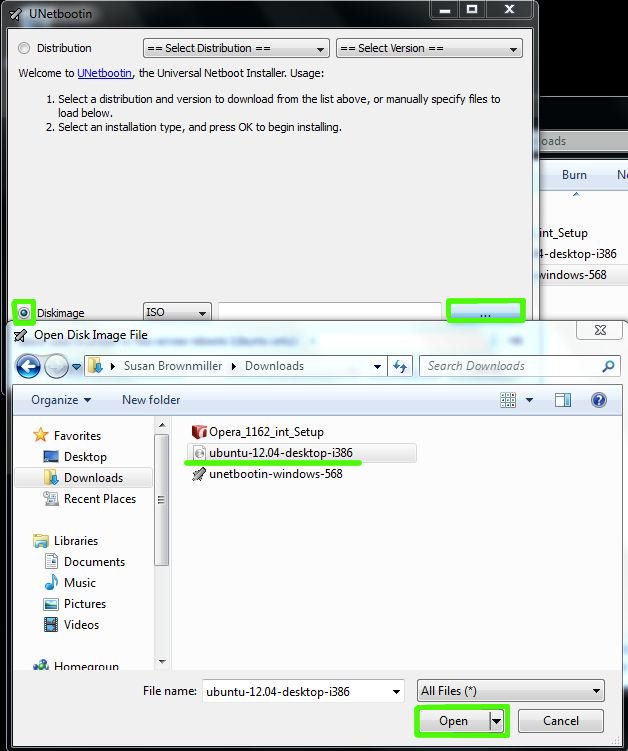
You'll then be presented with two options. You can either select Ubuntu from the distribution list and leave it up to UNetbootin to download the Ubuntu .iso for you or, if you already have the .iso downloaded, select the .iso yourself. (I'd recommend the latter option.)
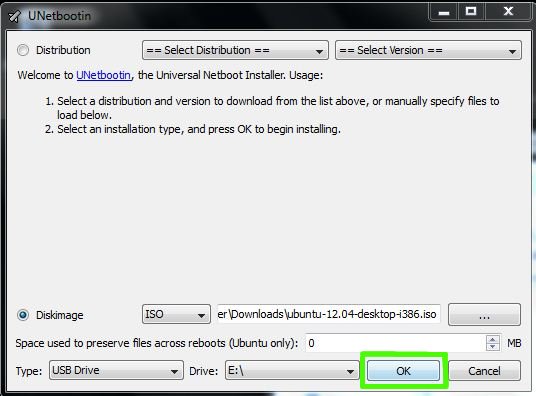
Once you've done that, select the USB drive you want to "burn" the .iso to, and then click OK.

Most of the files will copy quickly to your USB drive. If you notice it stays a bit long on a file called filesystem.squashfs, don't worry. That is a normal (it's a huge file).

You can, of course, reboot immediately once it's done.

Windows may tell you the program didn't install correctly. Since you didn't actually install a program, you can ignore the warning and just click This program installed correctly.

If you choose to wait on the reboot, you can take a look at the contents of your USB drive, and you should see a bunch of lowercase filenames like these.
Now your USB drive is ready to boot Ubuntu up!
To get your BIOS to boot from USB, you may have to press a special key right when you bootup (it could be F9, Escape, Delete, or F12, depending on what you have).
Note: If you're using UNetbootin in Ubuntu 10.04 (and not in Windows), you may get an error message when you try to boot the USB stick. Instead of UNetbootin, use Ubuntu's own built-in USB Creator application.
Last updated 04/27/12 10:35
If you have suggestions or corrections for these tutorials, please post in this Ubuntu Forums thread or leave a comment on my blog.
I will not give help to people posting in the above places. If you require technical support, start a support thread on the Ubuntu Forums. That is the appropriate place to ask for help.